
Chat with QuickBooks means asking a plain-English question about your business and getting a real, sourced answer back from your own QuickBooks Online data, not a canned reply from a support bot. It works through natural-language querying (NLQ): you type a question, the system translates it into a database query against your books, and it returns numbers, a short narrative, or a formatted report. Production hybrid NLQ pipelines have hit roughly 88% exact-match accuracy on real finance questions, which is solid but not perfect. The practical next step: pilot it on one company file, map your chart of accounts first, and run a fixed set of CFO questions before trusting it for board reporting.
- Define scope: financial queries and report generation only, not customer support
- Start small: one QuickBooks Online entity, mapped accounts, 10 to 20 test prompts
- Verify before you scale: check answers against source transactions
Quick stat: Component accuracy in tested pipelines reaches 97% for entity recognition and 96% for entity disambiguation, the two building blocks that make overall query accuracy possible.
Key Takeaways
Chat with QuickBooks works when natural-language querying is paired with firm-specific business rules, scoped access controls, and an audit trail back to source transactions.
| Point | Details |
|---|---|
| Define the scope early | Limit the pilot to financial reporting and analysis, not general support tasks. |
| Expect strong but imperfect accuracy | Production pipelines report around 88% exact-match accuracy on real finance queries. |
| Map accounts before asking questions | A clean chart of accounts mapping determines whether answers are trustworthy. |
| Govern every write-back | Require approval gates, audit logs, and a rollback path for any action that touches the ledger. |
| Peregrine implements this end to end | Peregrine connects via scoped OAuth, applies firm-specific rules, and audits every answer back to QuickBooks. |
Table of Contents
- What Does Chatting With QuickBooks Actually Involve?
- Why Finance Teams Are Adopting Conversational QuickBooks Tools
- What Prompts Should You Actually Try First?
- How the Technology Behind the Chat Actually Works
- Setting Up Chat With QuickBooks: A Practical Checklist
- How Accurate Is AI-Powered QuickBooks Reporting?
- What Finance Leaders Get Wrong About AI Chat Tools
- Why Peregrine Is Built for This Exact Job
- Frequently Asked Questions
- Sources
What Does Chatting With QuickBooks Actually Involve?
Think of it as a translator sitting between your question and your ledger. You type something like "what was our gross margin last quarter," and the system converts that sentence into a structured query, pulls the relevant transactions from QuickBooks Online, and hands back a validated answer. NLQ systems exist specifically so people who don't write SQL can still get data on demand, translating everyday language into the retrieval steps a database understands.
This is not the same thing as messaging QuickBooks customer support or an Intuit help bot. It's a financial analytics layer that sits on top of your books:
- Accepts plain-English questions about revenue, expenses, cash, and trends
- Returns tables, key metrics, variance notes, or a downloadable report
- Stays scoped to your financial data, not general troubleshooting
Intuit's own agentic automation in QuickBooks Online already surfaces some insights automatically while keeping the user in control of updates. A dedicated chat layer goes further, handling open-ended, ad hoc questions rather than fixed dashboard views.
Why Finance Teams Are Adopting Conversational QuickBooks Tools
The appeal comes down to speed and access. Instead of waiting on a bookkeeper to pull a custom report, a controller can ask the question directly and get an answer in seconds. That changes who can touch financial data, not just how fast they get it.
Democratized access matters more than it sounds. A sales manager who wants to see regional revenue trends no longer has to file a request and wait two days. Anyone with permission can ask, get a sourced answer, and move on. Speed to insight compounds across a finance team: fewer Slack messages asking "can you pull this," fewer spreadsheet exports, fewer version-control headaches.
Common use cases finance leaders lean on:
- Variance analysis — "Why did marketing spend jump 22% in March compared to February?" returns both the number and the underlying transactions driving it.
- Board-pack generation — pull a standardized revenue, margin, and cash summary in the exact format your board expects, every month, without rebuilding it from scratch.
- Rolling cash-forecast snapshots — ask for a 13-week cash view updated with the latest bank feed data instead of rebuilding a spreadsheet model.
- Covenant monitoring — check debt covenant ratios against current financials before a lender calls asking why you missed a threshold.
- Month-end close checks — spot uncategorized transactions or unusual account balances before you close the books, not after.
The operational payoff shows up in the details: fewer manual report pulls, faster turnaround on ad hoc requests from investors or lenders, and a cleaner audit trail when every query links back to the actual QuickBooks transactions behind it. That last point matters more than it seems. When an auditor asks how a number was calculated, "the AI said so" isn't an answer. A query tied to source transactions is.
What Prompts Should You Actually Try First?
Vague questions get vague answers. The sharper your prompt, the more useful the output, whether you're chatting with QuickBooks directly or through a connected NLQ layer. Start with a handful of proven patterns and adjust from there.
- "Show revenue, COGS, and gross margin by month for the last 6 months; flag any month-over-month decline over 5%."
- "List all expenses over $5,000 in Q1 2026 by vendor and account."
- "What's our current cash balance and 13-week forecast, broken out weekly?"
- "Summarize this month's financials in three sentences for a board update."
- "Export accounts receivable aging as a CSV, sorted by days overdue."
- "Compare actual vs. budgeted opex by department for the current quarter."
- "Which customers account for 80% of revenue this year?"
- "Show me the trend in customer acquisition cost over the last four quarters."
- "Drill into the marketing expense spike in March. Which vendors drove it?"
- "Calculate our debt service coverage ratio using current financials."
Pro Tip: Always specify the date range, account grouping, and output format you want (table, narrative, or CSV). "Show Q3 revenue by product line as a table" gets a far more precise answer than "how did we do in Q3."
How the Technology Behind the Chat Actually Works
Under the hood, this isn't one model guessing at your numbers. A reliable pipeline runs in stages: scoped OAuth connects to QuickBooks Online, an indexing layer catalogs transactions and metadata, and a retrieval engine matches your question to the right data before generating a response, as detailed in this technical blog on building text-to-SQL engines.
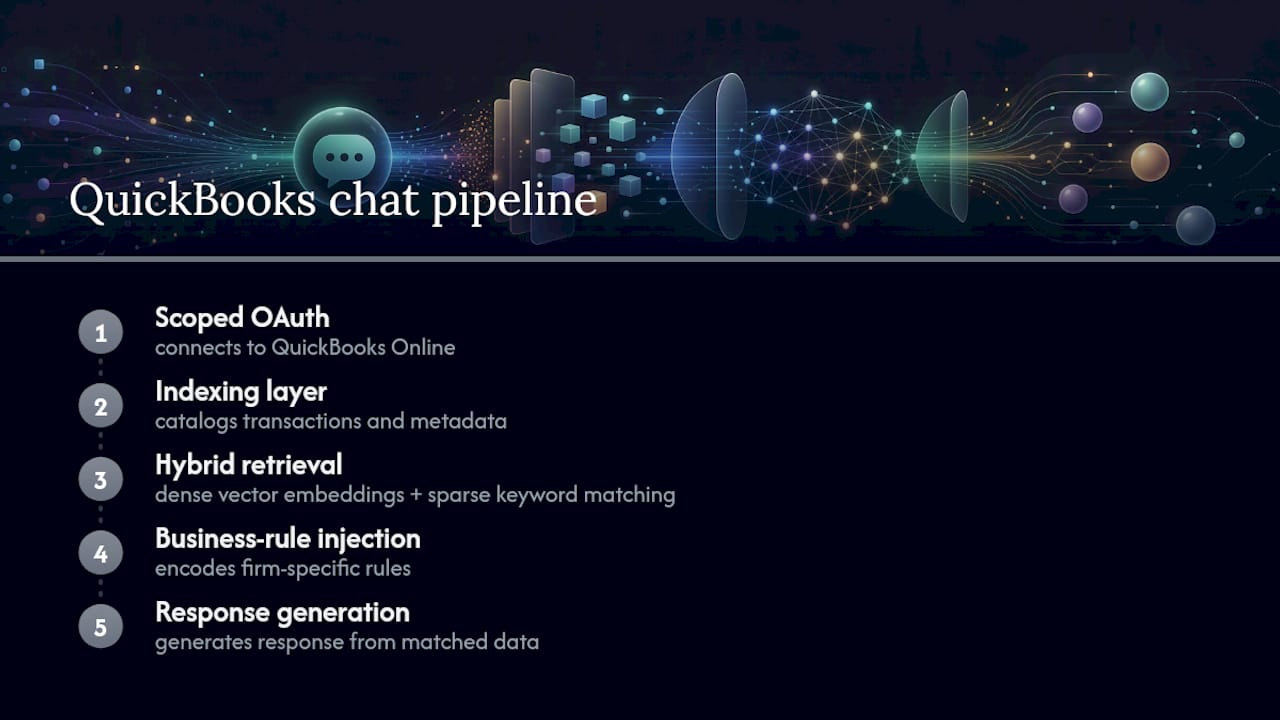
The retrieval step is where most systems succeed or fail. Hybrid architectures that combine dense vector embeddings with sparse keyword matching tend to outperform either approach alone, because financial language is full of abbreviations, jargon, and terms that mean different things in different contexts ("margin" on a P&L versus "margin" in a loan agreement). Dense vectors catch semantic meaning; sparse keyword matching catches exact terms like account codes or vendor names that a purely semantic search might blur together.
Even a well-tuned hybrid search isn't enough on its own. Finance questions often carry compressed, jargon-heavy phrasing and implied business logic, like unwritten rules about how your company defines "recurring revenue" or which entities roll into consolidated reporting. That's why business-rule injection matters: a deterministic layer that encodes your firm's specific calculations and definitions, rather than relying entirely on the model to infer them from context. Generic, off-the-shelf NLQ tools tend to stumble here precisely because they can't absorb firm-specific rules quickly, which is a real gap between what marketing promises and what a raw model can reliably do out of the box.
Setting Up Chat With QuickBooks: A Practical Checklist
Treat this like any system rollout, not a toggle you flip on. A rushed setup produces confident-sounding wrong answers, which is worse than no answers at all.
Before you connect anything:
- Pick one pilot company file, not your entire portfolio
- Nominate two or three stakeholders who'll test and validate outputs
- Map your chart of accounts and classes so the system knows what "revenue" and "COGS" mean in your books
- Write down 10 to 20 test questions you already know the correct answers to
During integration:
- Configure scoped OAuth access to QuickBooks Online with least-privilege permissions
- Decide read versus write rules upfront; most pilots should start read-only
- Set your sync cadence, near real-time for cash and AR, scheduled batch for less time-sensitive reports
Before you scale beyond the pilot:
- Require approval gates for any write action back into QuickBooks
- Turn on audit logging for every query and every automated action
- Run acceptance testing against your known-answer questions and track accuracy over time
A sensible rollout order mirrors how most QuickBooks-connected AI agents get deployed in practice: start with lower-stakes tasks like receipts and bank feed categorization, then move to management reporting once the categorization layer is stable. Chasing board-ready output on day one, before the underlying data is clean, is how pilots fail.
How Accurate Is AI-Powered QuickBooks Reporting?
No NLQ system gets every question right, and any vendor claiming otherwise should raise a flag. The most useful benchmark comes from a production hybrid pipeline that reported an 88% exact-match accuracy rate on real business queries, with component accuracy (entity recognition and disambiguation) in the mid-90s. That gap between 96% to 97% component accuracy and 88% end-to-end accuracy is the real lesson: errors compound across a multi-step pipeline, so testing the whole chain matters more than testing any single piece.
That means governance isn't optional. A workable framework looks like this:
- Build a fixed set of test questions with known correct answers and re-run them after any schema or business-rule change
- Set explicit accuracy targets before launch, not after a client complains
- Require every answer to link back to the source QuickBooks transactions it drew from, so anyone can verify a number in one click
- Keep a human in the loop for any material write-back to the books, with a clear rollback path if something goes wrong
Mixing model-based reasoning with rule-based, deterministic components is what lets a system both learn from patterns and still guarantee predictable behavior finance teams can actually rely on. Pure machine-learning guessing, without deterministic guardrails, is not something you want anywhere near your ledger.
What Finance Leaders Get Wrong About AI Chat Tools
Most of the skepticism around AI-powered financial chat is aimed at the wrong target. People worry about the AI "getting the number wrong," when the bigger risk is usually a system that was never taught your firm's specific rules in the first place. A generic NLQ layer bolted onto raw QuickBooks data without business-rule injection will misread your custom revenue recognition policy or your unique class structure long before it makes an arithmetic error.
The conventional advice, "just connect it and start asking questions," undersells how much setup work actually determines whether the tool is useful. A mapped chart of accounts and a tested prompt library matter more than which model is running underneath. I'd also push back on the assumption that accuracy is a launch-day checkbox. It's an ongoing practice: schema changes, new account types, and evolving business rules all shift the ground under a working system if nobody re-tests it.
What should come first, before evaluating any vendor, is deciding what "good enough" accuracy looks like for your own reporting stakes. A rough number for internal Slack chatter is a different bar than a figure going into a board deck or a covenant certificate. Match the governance to the stakes, not the other way around.
Why Peregrine Is Built for This Exact Job
Generic AI chat bolted onto your books is a liability waiting to happen. Peregrine is built the opposite way: it connects to your QuickBooks Online through scoped OAuth, injects your firm's specific business rules and account mapping, and returns answers with an audit trail back to the source transaction, so nothing you present to a board or a lender is a black box.
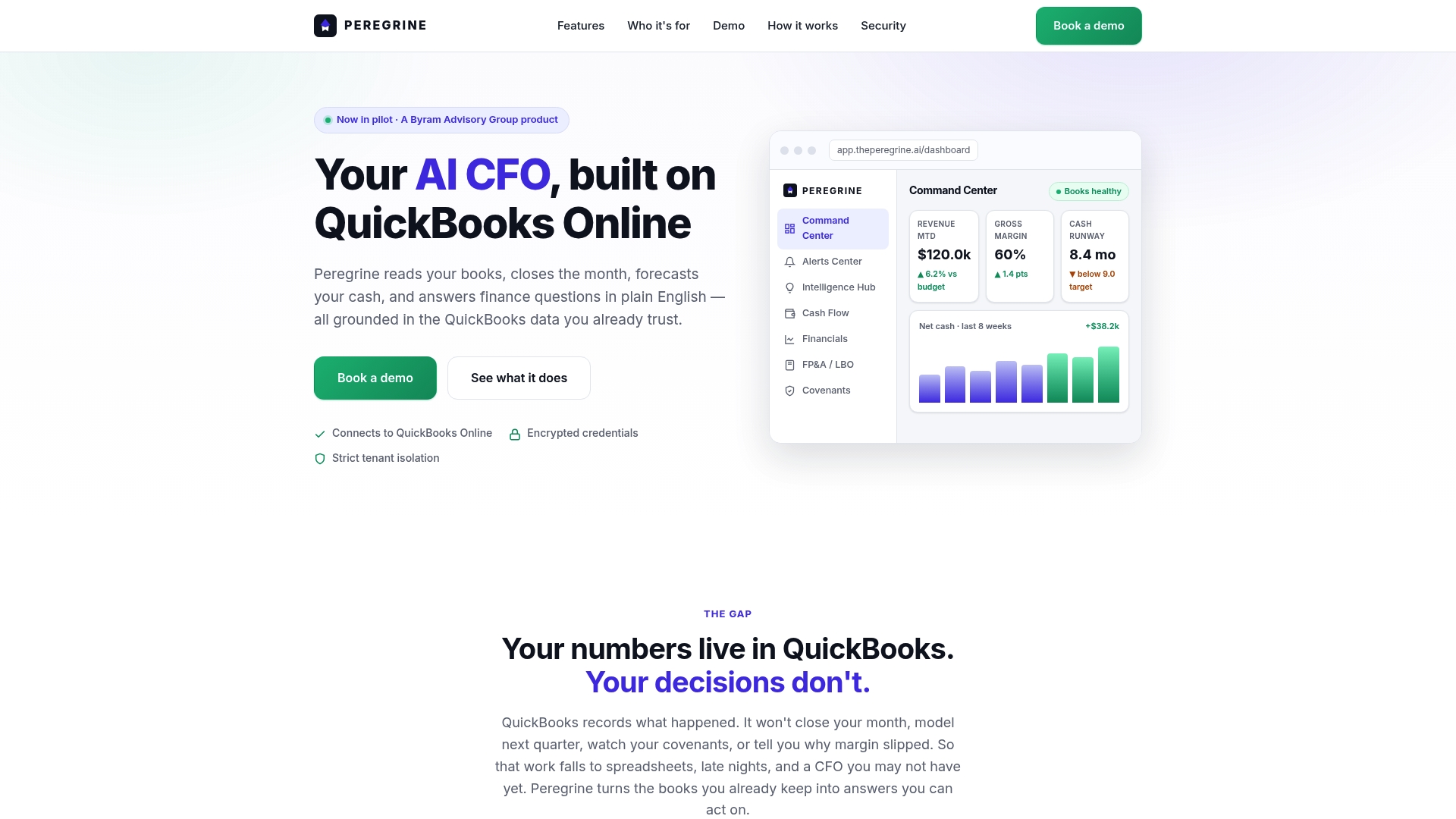
Onboarding follows the same sequence outlined above because that sequence works: discovery and chart-of-accounts mapping first, then configuring business rules and access permissions, then a scoped pilot, then scaling to your full reporting stack. Peregrine's implementation guide walks through exactly what that first 30 days looks like, from initial connection to your first automated board pack. If security and data handling are part of your evaluation, the subprocessor documentation covers exactly how access control and data residency work.
If you're ready to see CFO-grade answers pulled straight from your own QuickBooks Online data, start with Peregrine and connect your first company file today.
Frequently Asked Questions
Is chatting with QuickBooks the same as QuickBooks customer support chat? No. This capability is a natural-language analytics layer that queries your financial data and returns reports or insights. QuickBooks customer service chat handles account and product support issues, an entirely separate function.
How accurate are AI answers pulled from QuickBooks data? Production hybrid NLQ systems have reported around 88% exact-match accuracy on real business queries, with higher component accuracy for entity recognition. Accuracy depends heavily on how well the chart of accounts is mapped and whether firm-specific business rules are built in.
Can this replace a bookkeeper or controller? No. It removes manual report pulls and speeds up ad hoc analysis, but a human still needs to validate outputs, especially for board reporting, lender communications, and any write-back to the ledger.
What permissions does a QuickBooks chat tool need? A properly configured integration uses scoped OAuth with least-privilege access, meaning it only reads or writes the specific data categories you authorize, and access can be revoked at any time.
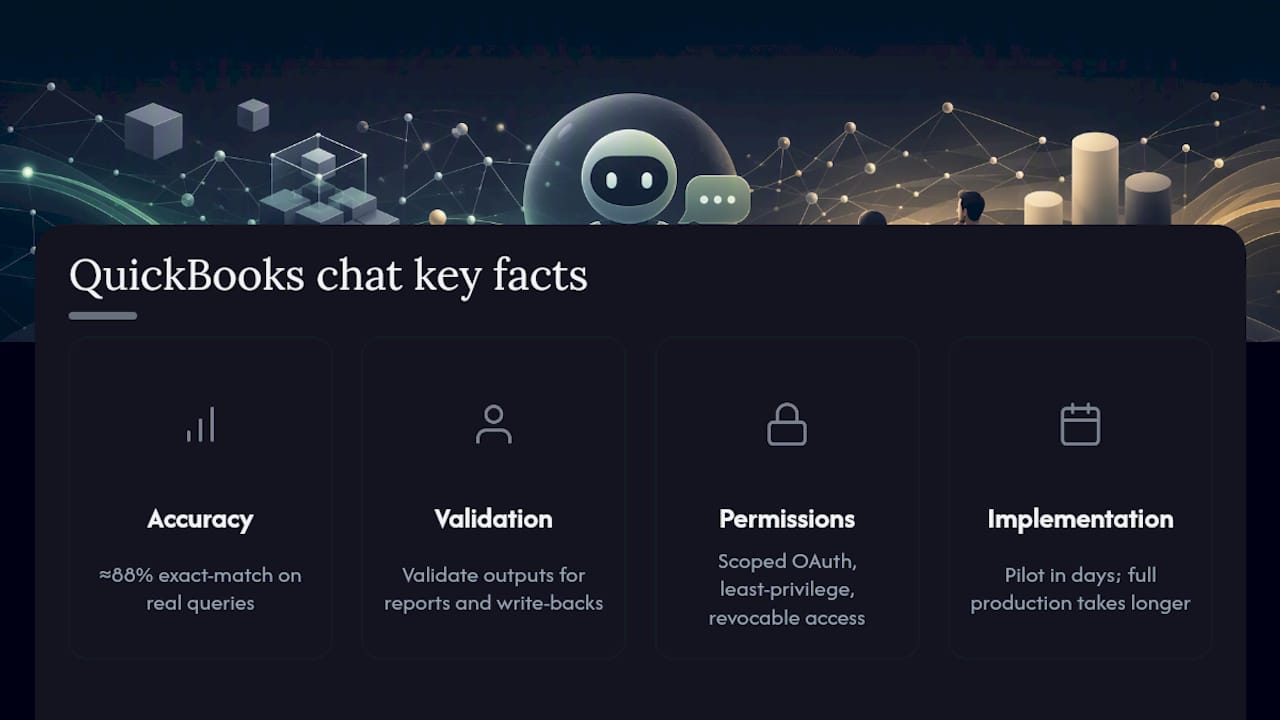
How long does implementation typically take? A focused pilot on a single company file, with accounts mapped and a test prompt library ready, can be running within days. Scaling to full production reporting and multiple entities takes longer and depends on how much business-rule customization your reporting requires.
Sources
- FinMetaMind: A Tech Blueprint on NLQ Systems for Financial Knowledge Search
- Conversing with databases: Practical Natural Language Querying
- Overview of Intuit AI in QuickBooks Online