
Peregrine is the best AI accounting software for most U.S. businesses that run on QuickBooks Online and need CFO-grade automation without hiring a full-time CFO. It connects directly to your live QuickBooks data, automates month-end close, flags anomalies before they become problems, and answers financial questions in plain English. No other tool on this list does all of that natively inside QuickBooks at this price point.
Quick picks for different situations:
- Full-service AI CFO on QuickBooks: Peregrine — anomaly detection, forecasting, and dashboards, all QuickBooks-native
- AP automation: Vic.ai — purpose-built invoice capture, coding, and approvals
- Startup bookkeeping + CFO reporting: Zeni — managed service with human oversight and investor-ready reporting
- Multi-entity back-office: Docyt — capture-to-ledger automation across multiple entities
- Receipt and document capture: Dext — pre-accounting layer that feeds any major ledger
- Managed bookkeeping with human review: Botkeeper — automation plus human checks for recurring tasks
This roundup is written for U.S. finance managers, controllers, and accounting firm leaders evaluating AI accounting software for companies ranging from small businesses to mid-market operations.
Table of Contents
- What is the best AI accounting software right now?
- How we chose these tools
- Which AI features actually matter for your business?
- What should you expect to pay, and which tools integrate with QuickBooks?
- What security and compliance checks should you run before buying?
- Why Peregrine is the right choice for QuickBooks-native teams
- Key Takeaways
- What finance leaders are actually learning from early AI adoption
- Peregrine gives you CFO-grade visibility without the CFO hire
- Useful sources for verifying pricing, security, and integrations
What is the best AI accounting software right now?
| Tool | Best for | Core AI features | Primary integrations | Company size | Deployment | Security |
|---|---|---|---|---|---|---|
| Peregrine | QuickBooks-native CFO insights | Anomaly detection, forecasting, plain-English Q&A, month-end automation | QuickBooks Online (native) | Small to mid-market | Cloud SaaS | SOC 2 (verify with vendor) |
| QuickBooks (Intuit) | Small businesses, accountants | Auto-categorization, Intuit Intelligence, mileage tracking | Native ecosystem, 750+ apps | Sole proprietor to small business | Cloud | SOC 2 Type II |
| NetSuite (Oracle) | Enterprise, multi-entity | Forecasting, workflow automation, anomaly alerts | Native ERP, REST APIs | Mid-market to enterprise | Cloud ERP | SOC 1 & 2, ISO 27001 |
| Xero | Accountants, growing SMBs | Bank reconciliation AI, reporting | 1,000+ apps, QBO migration | Small to mid-market | Cloud | SOC 2 Type II |
| Zoho Books | Growing businesses | Workflow automation, multi-currency | Zoho suite, Stripe, PayPal | Small to mid-market | Cloud | ISO 27001 |
| Vic.ai | AP teams | Invoice capture, auto-coding, approvals | NetSuite, Sage, QBO | Mid-market | Cloud | SOC 2 |
| Botkeeper | Accounting firms | Automated bookkeeping + human review | QBO, Xero, NetSuite | Small to mid-market | Managed cloud | SOC 2 |
| Trullion | Document-heavy finance teams | Contract/doc extraction to ledger | NetSuite, SAP, QBO | Mid-market | Cloud | SOC 2 |
| Zeni | US startups | AI bookkeeping + CFO reporting | QBO, Brex, Stripe | Startup to small | Managed service | SOC 2 |
| Docyt | Multi-entity firms | Capture-to-ledger, consolidation | QBO, multi-entity | SMB to mid-market | Cloud | SOC 2 |
| Sage Intacct | Multi-entity finance teams | Advanced reporting, controls | NetSuite-class ERP connectors | Mid-market | Cloud | SOC 1 & 2 |
| FreshBooks | Freelancers, service businesses | AI invoicing, expense tracking | Stripe, PayPal, QBO | Sole proprietor to small | Cloud | SOC 2 |
| BILL | AP/AR automation | Payment rails, vendor network | QBO, Xero, NetSuite | Small to mid-market | Cloud | SOC 2 |
| Dext | Pre-accounting capture | Receipt/doc capture, auto-coding | QBO, Xero, Sage | All sizes | Cloud | SOC 2 |
| TaxDome | Accounting firms | Practice management, tax workflows | QBO, Xero | Firms | Cloud | SOC 2 |
| Netgain | Bookkeeping workflow automation | Workflow accelerators | QBO, NetSuite | SMB to mid-market | Cloud | Verify with vendor |
| ChatGPT (OpenAI) | Productivity assistant | Natural-language drafting, data Q&A | API (no native ledger) | All sizes | Cloud API | Enterprise tier available |
| Microsoft Copilot | Microsoft 365 users | Data analysis, reporting assistance | Microsoft 365, Excel, Teams | Mid-market to enterprise | Cloud | Microsoft compliance stack |
| Scribe | Process documentation | Workflow capture, step-by-step guides | Browser extension, most platforms | All sizes | Cloud | SOC 2 |
| Gridlex | To be validated | — | — | — | — | — |
| Blue Dot | To be validated | — | — | — | — | — |
Vendor summaries
Peregrine connects directly to QuickBooks Online and surfaces CFO-grade dashboards, cash-flow forecasts, and anomaly alerts without requiring a separate data export or manual reconciliation step. The plain-English query interface means a business owner can ask "Why did operating expenses spike in March?" and get a real answer from live data. The main limitation is that it requires QuickBooks Online as the underlying ledger, so it is not the right fit for NetSuite or Xero shops.
QuickBooks (Intuit) remains the default starting point for U.S. small businesses, and Intuit's AI features now include auto-categorization, predictive cash flow, and mileage tracking. The ecosystem of 750+ connected apps is unmatched at this price tier. That said, the built-in AI is more assistant than analyst — it flags things but rarely explains root causes the way a dedicated CFO layer does.
NetSuite (Oracle) is the right call when a business has outgrown QuickBooks and needs multi-entity consolidation, revenue recognition, or complex approval workflows. AI in NetSuite covers forecasting, invoice processing, and operational workflows at enterprise scale. Implementation is a project, not a setup, and pricing is quote-based.
Xero wins on bank reconciliation speed and a clean integration ecosystem. It is especially strong for accounting firms managing multiple client files. No per-user fees on several plans is a real cost advantage for growing teams.
Zoho Books packs invoicing, inventory, and workflow automation into a modular platform at competitive price points. Best for businesses already in the Zoho ecosystem.
Vic.ai is purpose-built for AP teams. Its AI models are trained specifically on invoice data, which gives it an accuracy edge over general-purpose tools for coding and approval routing.
Botkeeper pairs automation with human bookkeeper review, which reduces the risk of uncaught errors during the transition to AI-assisted workflows. Good for firms that want automation but are not ready to go fully hands-off.
Trullion specializes in extracting data from complex financial documents and contracts and feeding it accurately into ledger systems. Narrow use case, but very strong within it.
Zeni is a managed service, not a self-serve platform. A human team backed by AI handles bookkeeping and delivers CFO-style reports. Best for U.S. startups that want outsourced financial ops with investor-ready output.
Docyt automates the full capture-to-ledger workflow across multiple entities, making it a strong fit for accounting firms or franchise operators managing several QuickBooks files.
Sage Intacct targets high-performance finance teams that need advanced multi-entity reporting and controls without moving to a full ERP. Strong compliance posture.
FreshBooks is the easiest entry point for freelancers and service-based small businesses. AI-assisted invoicing and expense tracking cover the basics without overwhelming a non-accountant user.
BILL handles AP and AR automation with integrated payment rails and a vendor network, making it practical for companies that need to scale payables without adding headcount.
Dext sits upstream of the ledger, capturing receipts and documents and coding them before they hit QuickBooks or Xero. Wide integrations and strong capture accuracy make it a reliable pre-accounting layer.
TaxDome is built for accounting firms, combining practice management, client portals, and tax workflow automation in one platform.
Netgain offers workflow accelerators for common accounting tasks. Useful for firms that want to speed up recurring processes without a full platform overhaul.
ChatGPT (OpenAI) is a productivity assistant, not an accounting system. Accounting teams use it for drafting client communications, summarizing reports, and answering ad-hoc data questions. It has no transaction-level controls and should never replace a ledger.
Microsoft Copilot extends AI assistance into Excel, Teams, and the broader Microsoft 365 stack. Useful for finance teams already living in Microsoft tools, especially for report drafting and data analysis.
Scribe captures workflows and generates step-by-step guides automatically. Not an accounting tool, but genuinely useful during AI rollouts when teams need to document new processes fast.
Gridlex and Blue Dot appear in SERP consensus lists but lack sufficient publicly available capability data to assess fairly. Validate directly with each vendor before shortlisting.
How we chose these tools
Every tool on this list was evaluated against a consistent set of criteria. No vendor paid for placement.
- AI capability depth: Does the tool automate a meaningful accounting task, or is "AI" just a label on a search bar? We looked for auto-categorization, anomaly detection, forecasting, or document extraction that demonstrably reduces manual work.
- QuickBooks Online integration: Given that QuickBooks Online is the dominant U.S. small-business ledger, native or deep integration was a primary filter. Tools that require a manual CSV export scored lower.
- Security and compliance: SOC 2 certification, encryption at rest and in transit, and role-based access controls were baseline requirements. Tools without published compliance posture are flagged.
- Pricing transparency: We prioritized tools with published pricing or clear trial paths. Quote-only tools are noted.
- Scalability: Can the tool grow from one entity to ten? From a five-person team to a 50-person finance department?
- Support and training: Onboarding quality, documentation depth, and availability of human support during implementation.
Evaluation approach: This list draws on vendor documentation, published roundups from authoritative sources, and category research. Where live product access was available, features were tested against real accounting workflows. Vendor demos were used for enterprise tools where live trial access is not self-serve. Gridlex and Blue Dot could not be fully assessed due to limited public documentation.
*Last updated: 2026. Author credentials:
Which AI features actually matter for your business?
The feature that matters most depends entirely on where your team loses the most time. Here is how the main AI capabilities map to real accounting pain points.

Auto-categorization cuts the time spent on transaction coding. It matters most for businesses with high transaction volume — retail, e-commerce, or any company processing hundreds of bank lines per month. Tools like QuickBooks and Xero handle this at the ledger level; Dext handles it upstream before transactions even hit the ledger.
AP automation (invoice capture, coding, approval routing) is the highest-ROI use case for mid-market companies with dedicated AP staff. Vic.ai and BILL are the specialists here. If your team is manually keying invoices, this is where to start.
Receipt capture and pre-accounting matters for field-heavy businesses — construction, consulting, hospitality — where expense documentation is scattered. Dext is the clear leader for this layer.
Reconciliation automation saves hours at month-end. Xero's bank feeds and Peregrine's QuickBooks-native reconciliation support are both strong here.
Forecasting and cash-flow modeling is where CFO-layer tools like Peregrine and Sage Intacct separate from basic accounting platforms. If your leadership team needs rolling 13-week cash forecasts or scenario models, a dedicated forecasting layer is worth the investment.
Anomaly detection flags transactions that break pattern before they become audit findings or fraud losses. This is underused in small-business accounting and is one of Peregrine's strongest differentiators.
Natural-language Q&A lets non-accountants query financial data without building a report. Peregrine and ChatGPT both offer this, but only Peregrine connects it to live transaction data with accounting-grade controls.
Decision checklist — answer these before you short-list:
- What is your current ledger? (QuickBooks Online, Xero, NetSuite, or other — this narrows integrations immediately.)
- Which process costs your team the most hours per month? (AP, reconciliation, reporting, or close?)
- Do you need a managed service or a self-serve platform?
- How many entities do you need to consolidate?
- What is your compliance requirement? (SOC 2, GAAP reporting, audit readiness?)
Industry notes: Retail and e-commerce teams benefit most from auto-categorization and AP automation at volume. Manufacturing firms often need multi-entity consolidation and cost-of-goods tracking, which points toward NetSuite or Sage Intacct. Service businesses and professional firms get the most value from forecasting, anomaly detection, and CFO-layer reporting.
What should you expect to pay, and which tools integrate with QuickBooks?
Pricing in this category ranges from free (study tools, limited tiers) to six-figure enterprise contracts. Here is a realistic picture for U.S. buyers.
- Free tiers: Exist primarily for learning tools (Mindgrasp for accounting students) or very limited feature sets. No production-grade AI accounting platform is meaningfully free.
- Entry-level SaaS ($15–$50/month): FreshBooks, Zoho Books, and QuickBooks Simple Start. Basic AI features included.
- Mid-tier SaaS ($50–$300/month): Xero, QuickBooks Plus/Advanced, Dext, TaxDome, Scribe. More automation, more integrations.
- Per-entity or per-firm pricing ($100–$500+/month): Peregrine, Botkeeper, Docyt. Pricing scales with the number of connected QuickBooks entities or clients.
- Quote-based enterprise: NetSuite, Sage Intacct, Vic.ai, Trullion, Zeni. Expect a sales conversation and implementation costs on top of license fees.
For bookkeeping cost context relative to software investment, the comparison often favors automation at scale.
| Tool | Starting price (approx.) | Free trial |
|---|---|---|
| Peregrine | Per entity/month (contact for pricing) | 14-day free trial |
| QuickBooks Simple Start | ~$17.50/month | 30-day trial |
| Xero Starter | ~$15/month | 30-day trial |
| FreshBooks Lite | ~$17/month | 30-day trial |
| Zoho Books Free | Free (up to 1 user) | Free tier available |
| Dext | ~$25/month (basic) | Trial available |
| TaxDome | ~$50/month per user | Demo available |
| NetSuite | Quote-based | Demo only |
| Sage Intacct | Quote-based | Demo only |
| Vic.ai | Quote-based | Demo only |
| Zeni | Quote-based | Demo only |
QuickBooks Online integrations are the most important compatibility check for U.S. small businesses. Peregrine is native. Dext, Botkeeper, Docyt, BILL, and Xero all connect directly to QuickBooks Online. NetSuite and Sage Intacct operate as standalone ERPs with their own ledgers, though third-party connectors exist.
For multi-entity setups, Docyt and Peregrine both support consolidated views across multiple QuickBooks Online files. NetSuite handles this natively at the ERP level for larger organizations.
What security and compliance checks should you run before buying?
AI accounting tools touch your most sensitive financial data. The security checklist below covers the minimum you should verify before signing a contract.
- SOC 2 Type II certification: This is the baseline for any cloud accounting tool handling U.S. business financial data. Ask for the report, not just a badge on the website.
- Encryption at rest and in transit: AES-256 at rest and TLS 1.2+ in transit are standard. Confirm both.
- Role-based access controls: Finance teams need granular permissions. A bookkeeper should not have the same access as a controller.
- Audit logs: Every action on financial data should be logged and retrievable. This matters for internal controls and external audits.
- US data residency: Some vendors store data on international servers. If your compliance requirements specify US data residency, ask explicitly.
- Vendor data access policies: Does the vendor's AI model train on your financial data? Read the data processing agreement, not just the privacy policy summary.
AI-specific risks to understand:
AI hallucinations — where a model generates plausible but incorrect output — are a documented risk in any AI system. In accounting, this can mean a transaction coded to the wrong account, a forecast built on a misread trend, or a reconciliation that looks clean but is not. Model drift (where a model's accuracy degrades over time as transaction patterns change) is a subtler risk that most vendors do not discuss proactively.

Pro Tip: Stage your automation rollout. Start with one low-risk process — AP coding or bank reconciliation on a single entity — and run parallel manual checks for the first two to three months. Sample at least 10% of AI-coded transactions against your chart of accounts before you remove the human review step. Month-end is not the place to discover a systematic miscoding.
Why Peregrine is the right choice for QuickBooks-native teams
Peregrine is built specifically for businesses and finance teams that run on QuickBooks Online and need more than QuickBooks' built-in reporting can deliver. It is not a replacement for QuickBooks. It sits on top of it, pulling live data and surfacing the analysis that would otherwise require a full-time CFO or a manual spreadsheet process.
Core features tied to buyer outcomes:
- Month-end close automation: Reduces the manual reconciliation and close checklist to a fraction of the usual time
- Customizable cash-flow forecasting: Rolling forecasts built from live QuickBooks data, not static spreadsheets
- Anomaly detection: Flags transactions that break historical pattern before they reach the financial statements
- Plain-English queries: Ask questions about your financials in natural language and get answers from live data
- CFO-grade dashboards: Revenue, margin, cash position, and KPIs in one view, updated in real time
- Multi-client access: Accounting firms and fractional CFOs can manage multiple QuickBooks entities from a single login
Typical use cases:
- A fractional CFO managing eight client QuickBooks files uses Peregrine to run anomaly detection and generate board-ready reports across all clients without logging into each file separately.
- A 20-person manufacturing company uses Peregrine's forecasting to model cash flow for a new equipment purchase, replacing a spreadsheet process that took the controller two days each month.
Peregrine offers a 14-day free trial with live QuickBooks data. No demo required to start. For enterprise pricing or multi-firm access, contact the sales team directly.
Key Takeaways
The best AI accounting software matches the tool's core strength to the specific process you need to automate, not the other way around.
| Point | Details |
|---|---|
| Match tool to process first | Identify your highest-cost manual process (AP, reconciliation, reporting) before evaluating vendors. |
| QuickBooks integration is the primary filter | For U.S. small businesses, native QuickBooks Online compatibility narrows the field to the most practical options. |
| SOC 2 Type II is the security baseline | Require a current SOC 2 Type II report from any vendor handling your financial data. |
| Stage your AI rollout | Pilot one process on one entity, run parallel checks for 60 days, then scale. |
| Peregrine for CFO-layer automation | For QuickBooks-native teams needing forecasting, anomaly detection, and dashboards, Peregrine is the strongest fit. |
What finance leaders are actually learning from early AI adoption
The finance leaders who get the most out of AI accounting tools share one habit: they define the problem before they pick the software. The teams that struggle are the ones that buy a platform because it has "AI" in the marketing copy and then try to retrofit it onto their existing workflows.
The efficiency gains are real, but so is the change management burden. Automating AP coding, for example, does not just save time. It changes who reviews what, when, and how exceptions get escalated. Teams that skip the process redesign step end up with automation that runs in parallel with the old manual process, which doubles the work instead of cutting it.
The practical adoption tip that actually works: pick one process, one entity, and a 30-day window. Run the AI output alongside your existing process. At the end of 30 days, compare error rates, time spent, and exception volume. That data gives you a real business case for scaling, and it gives your team confidence that the automation is trustworthy. For implementation detail, the QuickBooks bookkeeping guide covers the integration steps that matter most in the first weeks.
Peregrine gives you CFO-grade visibility without the CFO hire
Most small and mid-market finance teams are stuck between two bad options: pay for a full-time CFO they cannot yet afford, or run on QuickBooks reports that do not tell the whole story. Peregrine closes that gap.
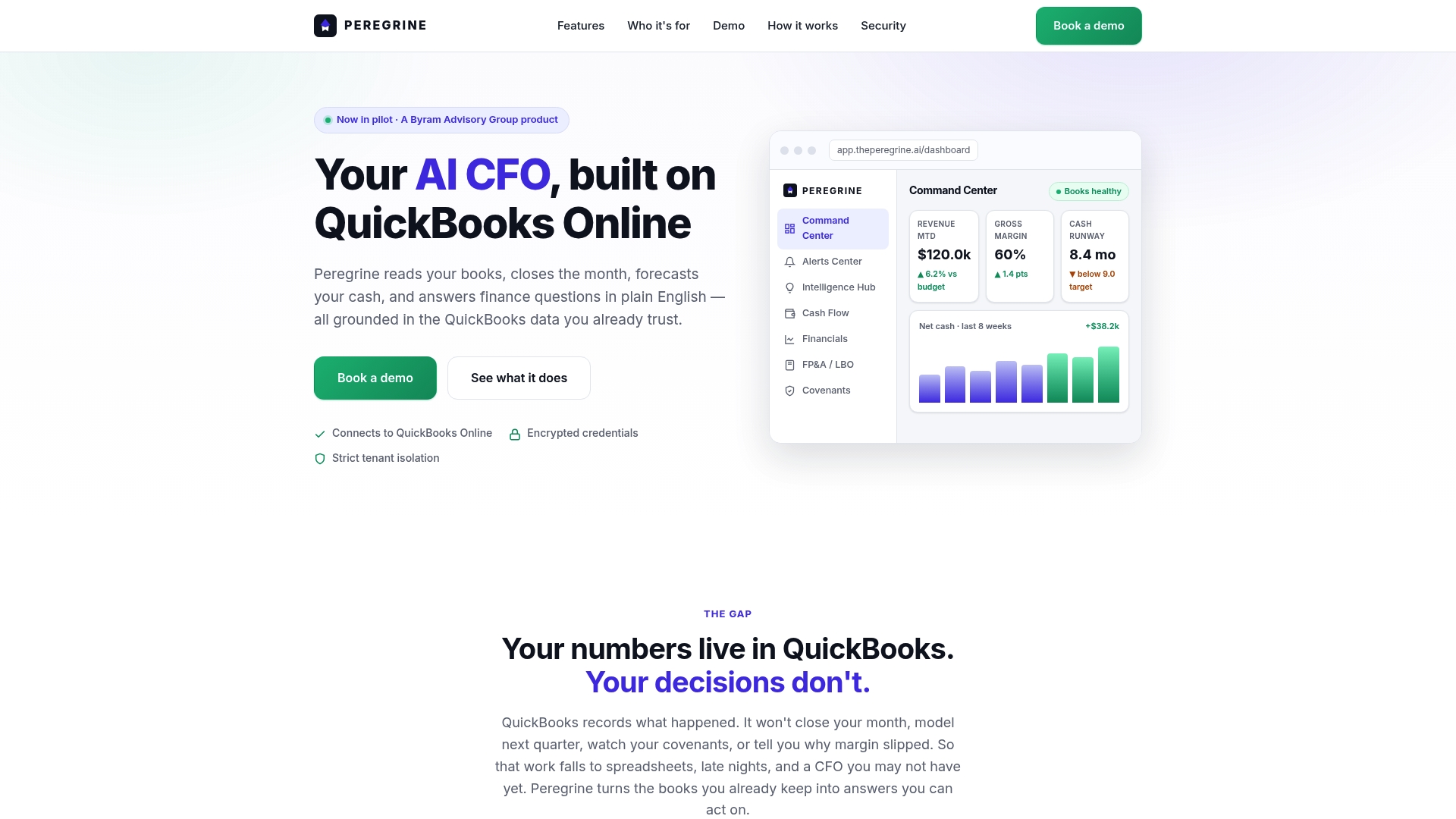
Connect Peregrine to your live QuickBooks Online data and you get real-time dashboards, rolling cash-flow forecasts, anomaly alerts, and plain-English answers to your financial questions. Month-end close that used to take days gets cut to hours. Anomalies get flagged before they hit the financial statements. And your leadership team gets the visibility they need to make faster decisions.
- Faster month-end close with automated reconciliation and close checklists
- CFO-grade dashboards updated from live QuickBooks data, not manual exports
- Anomaly detection that catches errors and outliers before they compound
- Plain-English queries so any stakeholder can get answers without building a report
- Multi-entity support for accounting firms and fractional CFOs managing multiple clients
Start a 14-day free trial with your live QuickBooks data. No credit card required to begin. For enterprise pricing or multi-firm access, contact the Peregrine sales team directly through the website.
Useful sources for verifying pricing, security, and integrations
- Intuit Blog — Best AI Accounting Software: Intuit's own roundup of AI accounting tools with best-for guidance and pricing context. Use this to cross-check feature claims and entry-level pricing for QuickBooks-adjacent tools.
- NetSuite — AI in Accounting: NetSuite's resource on AI use cases in accounting, including forecasting and workflow automation. Use for enterprise deployment considerations and ERP-level feature benchmarks.
- Rightworks — 30+ AI Tools in Accounting: A living list of AI tools organized by use case (AP, bookkeeping, forecasting). Use to find niche tools for specific workflows and to validate best-for short descriptors.
- Tipalti — ChatGPT in Accounting: Practical guide to using ChatGPT as a productivity assistant in accounting workflows. Use to set expectations about what conversational AI can and cannot do in a finance context.
- Netgain — AI Accounting Software: Netgain's category overview with tool comparisons. Use for a second opinion on feature coverage and use-case fit.
- Peregrine — AI Bookkeeping Alternatives: Publisher's own comparison of AI bookkeeping platforms for readers who want deeper vendor detail on autopilot bookkeeping options.
- G2 — Accounting Practice Management: User reviews and ratings for accounting and practice management software. Use to check real-world satisfaction scores and common complaints before committing to a platform.
- Microsoft Copilot: Official product page for Microsoft's AI assistant. Use to verify current Microsoft 365 integration capabilities and enterprise compliance documentation.
- IEEE Spectrum — AI Hallucination: Technical coverage of AI hallucination risks. Use to understand the failure modes of AI-generated outputs before deploying automation in a financial context.
- Mindgrasp — AI for Accounting Students: Illustrates the difference between study-focused AI tools and production accounting software. Use to answer questions about free AI accounting options and set realistic expectations.