
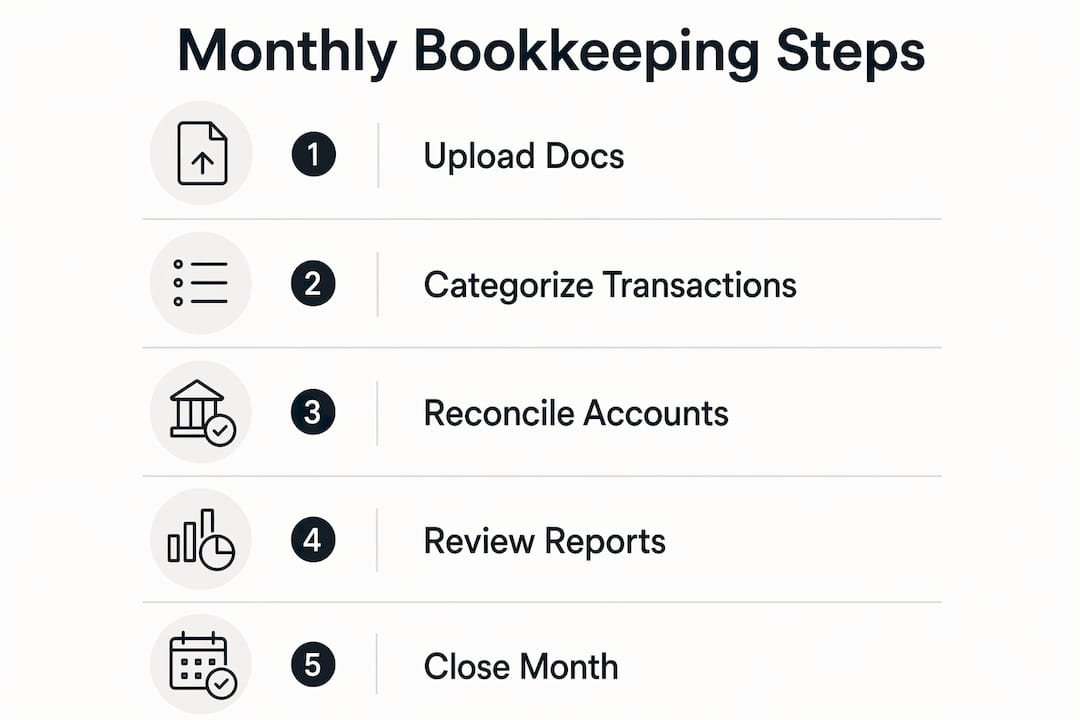
Monthly bookkeeping is the practice of closing your books each month: reconciling bank accounts, preparing a P&L and balance sheet, and surfacing the KPIs that drive real decisions. For QuickBooks Online users running AI automation, the best approach pairs automated bank-feed reconciliation with a short human review window, typically a few hours rather than days. Peregrine integrates directly with QuickBooks Online to handle that automation layer, flagging anomalies and generating reports so your review focuses on exceptions, not data entry.
The core monthly accounting tasks break down simply:
- Reconcile all bank and credit card accounts against the QuickBooks ledger
- Review and clear uncategorized transactions
- Run accounts receivable and accounts payable aging reports
- Prepare P&L, balance sheet, and cash-flow summary
- Log anomalies and share the month-end pack with stakeholders
Pro Tip: Start every month by checking bank-feed health and uncategorized transaction count in QuickBooks Online before touching anything else. A disconnected feed or a spike in uncategorized items is the fastest signal that something upstream broke.
Table of Contents
- What does a monthly bookkeeping checklist look like?
- Why does a monthly cadence actually matter?
- How does QuickBooks Online plus AI change the workflow?
- How do you set up a reliable monthly bookkeeping process in QuickBooks Online?
- What does monthly bookkeeping actually cost?
- Who should own monthly bookkeeping?
- What monthly reports and KPIs should you actually track?
- What are the red flags that break a monthly bookkeeping process?
- Key Takeaways
- The part most guides skip about AI bookkeeping
- Peregrine gives you the month-end close without the manual grind
- Useful sources and further reading
What does a monthly bookkeeping checklist look like?
A reliable month-end close follows a sequenced schedule. Published service flows show that uploading prior-month documents by day 5, processing within the first two weeks, and delivering finalized reports by mid-month are the practical standard.
| Days | Task | Owner |
|---|---|---|
| 1–5 | Upload bank statements, invoices, loan docs | Business owner |
| 1–5 | Reconcile bank and credit card feeds | AI platform / bookkeeper |
| 1–5 | Clear uncategorized transactions | AI platform + owner review |
| — | Review AP/AR aging; flag overdue items | In-house or fractional bookkeeper |
| — | Prepare P&L, balance sheet, cash-flow summary | AI platform / bookkeeper |
| 14–15 | Anomalies log and month-end pack delivery | AI platform + finance lead |
| — | Owner review, approvals, and follow-up questions | Business owner |
The month-end pack delivered to stakeholders should include: a P&L with prior-month comparison, a balance sheet, a cash-flow summary, an accounts receivable aging report, and an anomalies log noting any transactions that required manual override.
Why does a monthly cadence actually matter?
Quarterly or annual books feel manageable until you need a bank loan, face an audit, or realize your margins eroded three months ago. Block Advisors makes the case directly:
That framing matters. Monthly books give you the data to negotiate a credit line, catch a vendor billing error before it compounds, and spot a cash-flow gap before payroll week. Three concrete outcomes:
- Cash-flow control: Monthly reconciliation shows your actual runway, not an estimate.
- Faster decisions: Current P&L data cuts the lag between a business event and your response to it.
- Cleaner audits: Year-round IRS-ready books eliminate the scramble that turns a routine audit into a crisis.
How does QuickBooks Online plus AI change the workflow?
The new workflow is linear: bank feeds push transactions into QuickBooks Online, AI categorizes and reconciles them, a human reviews exceptions, and reports generate automatically. That last human step is not optional. Provider guidance consistently notes that owners must supply loan statements, flag unusual invoices, and answer categorization questions — automation accelerates the work, but context still comes from you.

| Task | Automated (AI/QBO) | Human Required |
|---|---|---|
| Bank-feed reconciliation | Yes | No |
| Transaction categorization | Yes | Exception review |
| Anomaly detection | Yes | Approval/override |
| Cash-flow forecasting | Yes | Assumption inputs |
| Vendor/payroll context | No | Yes |
| Final report sign-off | No | Yes |
Peregrine sits between QuickBooks Online and your finance team: it pulls live data from QBO, runs reconciliation and anomaly detection, and surfaces plain-English answers to questions like "Why did operating expenses spike in March?" The data flow is one-directional for inputs and bidirectional for approvals, so your QuickBooks ledger stays authoritative.
Pro Tip: When an unusual one-off transaction appears, add a memo in QuickBooks Online before the AI processes it. A two-word note ("lease deposit," "insurance refund") prevents miscategorization and saves a correction cycle later.
How do you set up a reliable monthly bookkeeping process in QuickBooks Online?
Start with a diagnostic before you automate anything. Many bookkeeping providers require a cleanup phase before monthly service begins, because bad historical data scales errors when fed into automation. That diagnostic is often a separate billable engagement.
Setup steps:
- Connect all bank and credit card feeds in QuickBooks Online and verify each feed pulls at least 90 days of history.
- Normalize vendor names using QuickBooks' merge-vendor tool to eliminate duplicates that break categorization rules.
- Map your chart of accounts to match your actual business structure, not the QBO default.
- Configure automation rules for recurring transactions (rent, SaaS subscriptions, payroll).
- Set approval workflows so anomalies route to the right reviewer before posting.
- Schedule your monthly close cadence with hard dates: documents due by day 5, reconciliation by day 10, reports by day 15.
For QuickBooks configuration specifics, the setup sequence matters as much as the tools.
Suggested timeline:
- Days 0–30: Diagnostic, cleanup, and feed connections
- Days 30–60: Automation rules live, first AI-assisted close
- Days 60–90: Review accuracy, adjust categorization rules, stabilize KPI dashboard
Track these KPIs as you stabilize: reconciliation lag (days from month-end to close), uncategorized transaction count, days sales outstanding (DSO), and cash runway in weeks.
What does monthly bookkeeping actually cost?
Costs split across three models. Transaction volume and required features are the primary drivers of price in every tier.
| Model | Typical Monthly Cost | Best For |
|---|---|---|
| DIY (QBO + apps) | $30/mo | Solo founders, low transaction volume |
| Fractional bookkeeper | $200–$400/mo plus setup fee | Growing businesses needing human judgment |
| Managed AI platform | $250–$450/mo plus setup fee | Businesses wanting automation + oversight |
A diagnostic or cleanup fee is common before any managed service starts, typically $500–$750, often applied to the first month's invoice. For a deeper breakdown of bookkeeping cost drivers, transaction volume, multi-entity support, and payroll filing each add to the base rate.
The move from DIY to managed makes financial sense when: reconciliation errors are appearing regularly, you're spending more than four hours per month on books, or you need investor-ready financials for a capital raise.
Who should own monthly bookkeeping?
| Business Profile | Recommended Ownership |
|---|---|
| Solo founder, low transaction volume | DIY with QBO + AI automation rules |
| Growing services firm, moderate transaction volume | Fractional bookkeeper + AI platform |
| Multi-entity startup or portfolio company | Managed AI platform with fractional CFO oversight |
| Capital-seeking business needing audited-ready books | Outsourced bookkeeping + CPA review |
Even with a fully AI-managed bookkeeping setup, a human touchpoint remains non-negotiable: someone must review the anomalies log, approve unusual transactions, and supply documents the system cannot source automatically.
What monthly reports and KPIs should you actually track?
| Report / KPI | What It Tells You |
|---|---|
| P&L (month + YTD) | Revenue trends, margin compression, expense drift |
| Balance sheet | Asset health, liabilities, net equity position |
| Cash-flow summary | Actual cash in/out vs. forecast |
| AR aging | Overdue receivables and collection risk |
| AP aging | Upcoming obligations and vendor payment health |
| Gross margin | Revenue minus COGS as a percentage |
| DSO | Average days to collect a receivable |
| Cash runway | Weeks of operating cash at current burn |
| Reconciliation lag | Days from month-end to closed books |
QuickBooks Online surfaces most of these natively. An AI platform like Peregrine layers forecasting and anomaly context on top, so you see not just what happened but why and what comes next. For a structured approach to cash-flow forecasting, runway and DSO are the two metrics worth reviewing first every month.
What are the red flags that break a monthly bookkeeping process?
Watch for these warning signs:
- Growing reconciliation backlog: More than two months unreconciled means errors are compounding.
- Persistent uncategorized transactions: A count above 5% of monthly volume signals a broken categorization rule.
- Frequent bank-feed disconnects: Reconnecting feeds manually every month introduces gaps and timing errors.
- Missing vendor statements: Loan amortization, lease schedules, and vendor credits must be supplied manually; automation cannot source them.
Triage in this order: restore bank-feed connections first, run a manual reconciliation stop-gap, then schedule a cleanup diagnostic to address root causes. If anomaly alerts are firing on every transaction, pause the automation rules and involve a human reviewer before re-enabling them. Reliable payment processing data feeding your bank accounts is often the upstream fix that resolves persistent feed issues.
Key Takeaways
A monthly bookkeeping cadence built on QuickBooks Online and AI automation gives you CFO-grade visibility, cleaner audits, and real-time cash-flow control without a full-time finance hire.
| Point | Details |
|---|---|
| Month-end sequence matters | Upload documents by day 5, close reconciliation by day 10, deliver reports by day 15. |
| Automation needs human context | Owners must supply loan docs, flag unusual invoices, and approve anomalies even with AI. |
| Costs vary by model | DIY runs $30/mo; managed AI platforms and fractional bookkeepers typically run $200–$450/mo plus setup fee. |
| Diagnostics come first | A cleanup phase before automation prevents historical errors from scaling into your live books. |
| Peregrine automates the close | Peregrine integrates with QuickBooks Online to handle reconciliation, anomaly detection, and forecasting with a short human review. |
The part most guides skip about AI bookkeeping
Most articles on monthly bookkeeping treat automation as a binary: either you're doing it manually or a machine handles it. That framing misses the actual failure mode.
The businesses that struggle with AI-assisted bookkeeping are not the ones who chose the wrong software. They're the ones who handed everything to the automation and stopped showing up. Bank feeds disconnect. A vendor changes their billing name. A one-time insurance payout hits the wrong account. None of those events are catastrophic on their own, but left unreviewed for two or three months, they produce a P&L that no longer reflects reality.
The right mental model is a pilot and autopilot relationship. Autopilot handles the routine flight. The pilot monitors, intervenes on exceptions, and makes judgment calls the system cannot. Monthly bookkeeping with AI works exactly the same way. The human role shrinks from data entry to oversight, which is a better use of your time, but it does not disappear.
What I'd push back on in most evaluations of AI bookkeeping tools is the focus on feature lists. The question that actually matters is: how does the system surface exceptions? A platform that buries anomalies in a report you have to dig for is not saving you time. A platform that flags them at the top of your review queue, in plain language, is.
Peregrine gives you the month-end close without the manual grind
CFO-grade monthly books used to mean hiring a controller or paying a fractional CFO a retainer that most growing businesses cannot justify. Peregrine changes that math by connecting directly to QuickBooks Online and automating the reconciliation, anomaly detection, and forecasting that previously required hours of manual work each month.
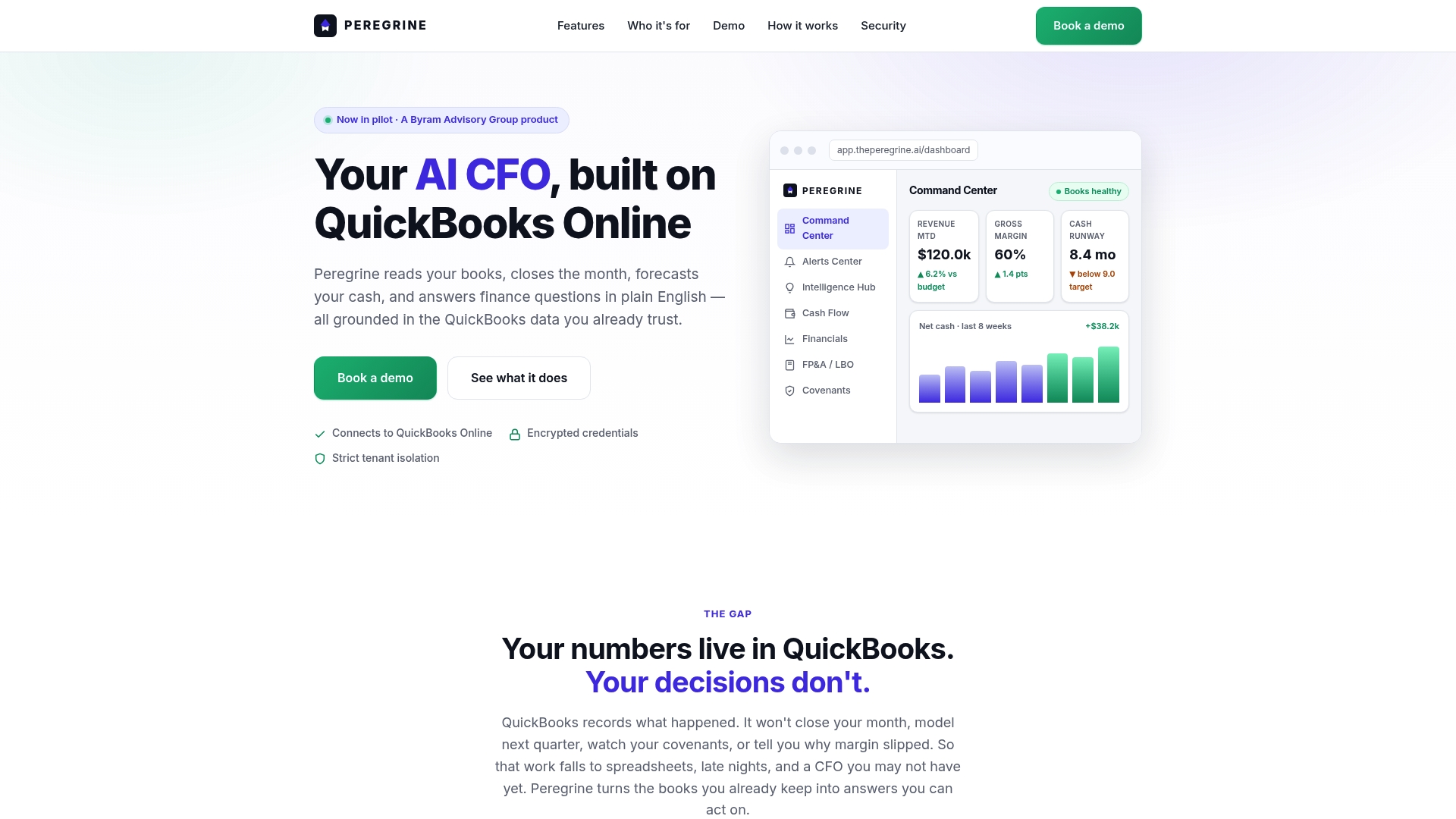
The features that matter for your monthly close: automated month-end reconciliation, plain-English financial inquiries ("What drove the margin drop in April?"), real-time cash-flow forecasting, and an anomalies log that routes exceptions to the right reviewer before they hit your books. Multi-entity support and role-based access mean your fractional CFO or accounting firm can work inside the same dashboard without a separate data export.
Start a 14-day free trial and measure three things during it: reconciliation accuracy against your manual baseline, time from month-end to closed books, and anomaly catch rate. Those three numbers tell you whether the platform earns its subscription.
Useful sources and further reading
- Block Advisors: Small Business Bookkeeping Services — supports the CFO-grade visibility claim and managed bookkeeping pricing context.
- IntegrateAcct: Monthly Bookkeeping Service — source for the upload-by-day-5, deliver-by-mid-month cadence and transaction-tier pricing.
- Bench: Monthly Bookkeeping — supports year-round IRS-ready books and the required human touchpoints in automated workflows.
- You Can Calculate: Monthly Bookkeeping — source for diagnostic/cleanup fee prevalence before managed service begins.
- Pilot: Bookkeeping and Accounting — supports the hybrid automation-plus-human model as the practical standard.
For tax-specific questions, consult your CPA. For product-specific guidance on Peregrine's QuickBooks Online integration, start with the 14-day free trial and the onboarding documentation.