
If you run financials through QuickBooks Online and still spend hours hunting for answers your data already contains, natural language financial analysis (NLFA) is the most direct fix available. Ask a plain-English question, get a CFO-grade answer in seconds. MIT Sloan field research found that AI-assisted accounting shortened monthly close by roughly 7.5 days and freed about 8.5% of accountant time from routine entry. Start with a single QuickBooks Online entity as your pilot.
Key Takeaways
Natural language financial analysis on QuickBooks Online cuts close time, reallocates accountant hours to higher-value work, and delivers CFO-grade answers from plain-English queries — but only when the underlying ledger is clean and governance controls are in place.
| Point | Details |
|---|---|
| Close time reduction | AI-assisted close can move timelines from 6–10 days toward 3–5 days with proper integration. |
| Accountant time reallocation | MIT Sloan field evidence shows roughly 8.5% of accountant time shifts from data entry to analysis. |
| Governance is non-negotiable | Role-based access, confidence thresholds, and immutable audit logs must be configured before go-live. |
| Start with a clean ledger | Dirty QBO data produces unreliable NLFA outputs; a cleanup sprint before setup is time well spent. |
| Peregrine for QBO users | Peregrine's native QuickBooks Online integration delivers plain-English queries, anomaly detection, and automated close support with a 14-day free trial. |
Table of Contents
- What does natural language financial analysis actually mean for QuickBooks Online?
- Where NLFA delivers measurable value for QBO users
- How NLFA works with your QuickBooks Online data
- How to keep NLFA outputs defensible and auditable
- A practical pilot roadmap for small businesses and fractional CFOs
- What to evaluate when choosing an NLFA solution for QuickBooks Online
- Sample plain-English queries and what good output looks like
- ROI and total cost of ownership for NLFA adoption
- NLFA solution providers in the QuickBooks Online ecosystem
- Common implementation challenges and how to fix them
- Why the "just ask your data" promise is more nuanced than it sounds
- Peregrine brings NLFA to your QuickBooks Online data
- Sources
What does natural language financial analysis actually mean for QuickBooks Online?
NLFA, in the context this article covers, means querying and analyzing your structured accounting ledger using plain-English questions rather than report menus or pivot tables. You type "What were my top five expense categories last quarter?" and the system reads your QuickBooks Online chart of accounts, translates your intent into a ledger query, and returns a formatted table or narrative. That is the scope: your QBO data, your questions, real answers.
This is distinct from NLP in finance applied to unstructured text such as earnings call transcripts or SEC filings. That is a different discipline for a different audience. NLFA for QBO users is about structured data: transactions, journal entries, account balances, and cash flows.
How does it differ from older automation?
- Rule-based RPA follows fixed scripts. It can auto-export a report on a schedule but cannot answer a question it was not pre-programmed for.
- AI agents understand intent, recognize financial entities (vendor names, account codes, date ranges), and generate responses dynamically. They also monitor conditions continuously and surface exceptions without being asked.
- NLFA sits at the intersection: it uses agent-style reasoning to answer ad hoc queries and run automated analysis over your live QBO data.
Where NLFA delivers measurable value for QBO users
The gains concentrate in a handful of high-frequency tasks:
- Plain-English reporting: Controllers and fractional CFOs replace manual report-building with typed queries. Close time drops because the system assembles the narrative; the human reviews and signs off.
- Continuous reconciliation: AI agents match transactions against bank feeds in real time, flagging mismatches the moment they appear. Corporate Finance Institute notes vendor reports of up to 85% faster reconciliations and McKinsey estimates of 20–30% less time on data processing for strong AI adopters.
- Anomaly detection: The system flags a vendor payment that is 40% above the prior three-month average, or a payroll line that posts twice in one week. Staff accountants catch these before they compound.
- Cash-flow snapshots and short-term forecasting: A single query surfaces current runway, projected inflows from open AR, and a 13-week cash outlook. Fractional CFOs use this to prep board updates in minutes rather than hours.
- Variance narratives: Instead of writing "Revenue was $12K above budget because of a one-time project," the system drafts that sentence from the underlying data. The accountant edits and approves.
- First-draft journal entries: NLFA tools can propose the debit/credit split for recurring accruals, flagging low-confidence items for human review. The MIT Sloan study also found ledger granularity improved by 12% when AI assisted with entry classification.
How NLFA works with your QuickBooks Online data
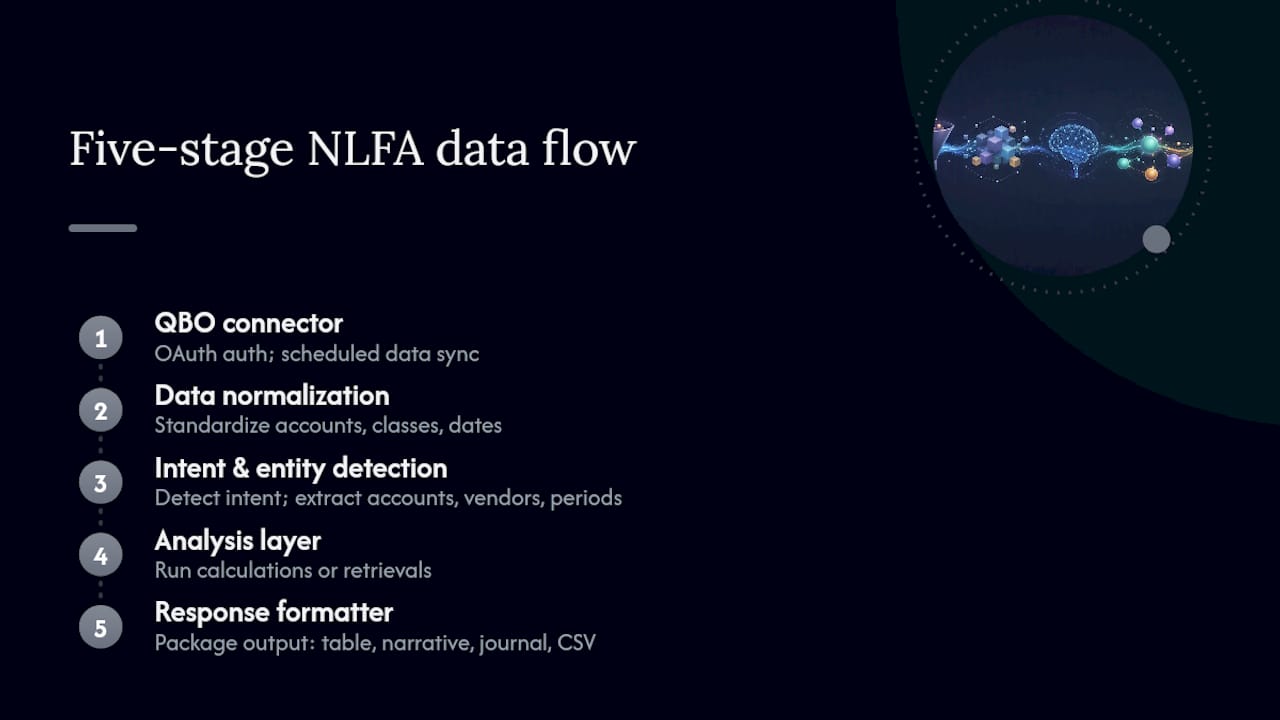
The data flow has five stages. A QBO connector authenticates via OAuth and pulls transaction data on a defined sync schedule (typically every few minutes to hourly). The data is normalized into a consistent schema so account names, classes, and date formats are standardized regardless of how the original QBO file was set up. When you submit a query, an intent-detection layer identifies what you are asking (a balance lookup, a trend comparison, an anomaly scan) and an entity-recognition layer picks out the specific accounts, vendors, or periods you named. The analysis layer runs the appropriate calculation or retrieval, then a response formatter packages the output as a table, a narrative paragraph, a draft journal entry, or an exportable CSV.
DataRails describes this as a three-layer architecture: a data layer, a workflow layer, and an insights layer. Well-run implementations can move close timelines from 6–10 days down toward 3–5 days where integrations and process maturity are in place.
Confidence scores are the mechanism that keeps humans in the loop. When the system is uncertain about an account mapping or an anomaly classification, it assigns a low confidence score and routes the item for human review rather than auto-posting. Draft journal entries above a configurable threshold post to a review queue; those below it are held.
For SMEs still running spreadsheet-heavy processes, MDPI research on RPA frameworks showed 88.6–95.5% reductions in manual processing time and 93.3–95.5% error reductions in experimental datasets. RPA is a viable transitional step, but API-driven NLFA scales further and produces better audit trails.
How to keep NLFA outputs defensible and auditable
Finance outputs need to hold up in an audit. These controls are non-negotiable:
- Role-based access: Read-only users see dashboards; approvers see draft entries; admins configure connectors. No one role should both generate and approve.
- Segregation of duties: The person who initiates a journal entry should not be the same person who approves it, whether human or AI-assisted.
- Immutable audit logs: Every query, every AI-generated response, and every human approval or rejection must be logged with a timestamp and user ID.
- Request and response logging: Store both the plain-English query and the system's output so you can reconstruct any analysis later.
- Data retention aligned with IRS Publication 4557: Retain records for the periods your tax obligations require, typically three to seven years depending on the transaction type.
- Encryption in transit and at rest: QBO data flowing through an NLFA connector must be encrypted end-to-end. Confirm your vendor uses TLS 1.2 or higher and AES-256 at rest.
- Confidence thresholds: Set a floor (for example, 85%) below which the system flags items for mandatory human review rather than auto-processing.
Pro Tip: Run a quarterly audit of your NLFA system's decision log. Pull a sample of auto-approved journal entries and trace each one back to its source transaction. If the system's reasoning does not match the underlying data, tighten your confidence threshold before the next close.
KPMG's Financial Close Companion, built with Workday and Google Cloud, illustrates where enterprise design is heading: AI orchestrates the workflow, humans retain sign-off authority at every critical gate.
A practical pilot roadmap for small businesses and fractional CFOs
A four-to-eight-week pilot is enough to validate NLFA against your actual QBO data before committing to a full rollout.
Weeks 1–2: Audit data quality. Check that your QBO chart of accounts is clean, classes are applied consistently, and bank feeds are reconciled through the prior month. A dirty ledger produces unreliable NLFA outputs regardless of the tool. Set up the connector, map roles, and configure confidence thresholds.

Weeks 3–4: Run NLFA in parallel with your existing close process. Do not replace anything yet. Compare AI-generated reconciliations and variance narratives against what your team produces manually. Log every discrepancy.
Weeks 5–6: Resolve discrepancies, adjust account mappings, and begin letting the system handle low-risk, high-confidence items autonomously. Train reviewers on the approval workflow and SOP for escalation.
Weeks 7–8: Measure against your baseline and decide on full rollout scope.
| Pilot success metric | Target |
|---|---|
| Days to close (pilot entity) | Reduction toward 3–5 days |
| Reconciliation exception rate | Below 2% of transactions |
| Accountant time reallocated | At least 8% toward analysis |
| AI output accuracy (sampled) | 95% or higher match to manual |
For teams still on spreadsheets, accounting automation guidance covers the transition from manual processes to API-driven workflows in practical detail.
What to evaluate when choosing an NLFA solution for QuickBooks Online
- Native QuickBooks Online connector with OAuth authentication (not a CSV import workaround)
- Sync reliability: ask for uptime SLAs and the maximum acceptable sync latency for your close schedule
- Explainability: can the system show you why it flagged an anomaly or proposed a journal entry?
- Confidence scoring with configurable thresholds
- Role-based access controls and approval workflows built in, not bolted on
- Immutable audit log with exportable records
- Multi-entity support if you manage more than one QBO file
- Export formats: CSV and PDF at minimum for audit and board reporting
Contract questions worth asking: What is the SLA for sync failures? How long is data retained after contract termination? What is the incident response time for a data security event? Is pricing per connected QBO entity or per firm?
On pricing: per-entity models favor fractional CFOs managing multiple clients because costs scale with the number of active engagements rather than seat count. Confirm whether the pilot period is free or discounted, and what migration effort looks like if you switch later. For a broader comparison of AI accounting platforms, the evaluation criteria above translate directly.
Sample plain-English queries and what good output looks like
These queries work against a properly connected QuickBooks Online file:
- "What is my current cash balance across all bank accounts?"
- "Show me all invoices overdue by more than 30 days."
- "Which vendors received more than $10,000 in payments last month?"
- "What was my gross margin by product line in Q1?"
- "Flag any expense transactions above $5,000 that lack a receipt attachment."
- "What is my projected cash position in 30 days based on open AR and scheduled AP?"
- "Compare payroll as a percentage of revenue this quarter versus last quarter."
- "List all journal entries posted after the 25th of last month."
- "Which customers account for more than 20% of my total revenue?"
- "Generate a variance narrative for operating expenses versus budget."
For query 2, a well-built NLFA system returns a table like this:
Validate outputs by spot-checking three to five line items against the raw QBO transaction register each week during the pilot. If the system returns a balance that does not match QBO's own report, the issue is almost always an account mapping error in the connector configuration, not a calculation fault.
Pro Tip: Always treat variance narratives as first drafts. Read the supporting data before you send any AI-generated commentary to a board or lender. One misclassified transaction can flip the story.
ROI and total cost of ownership for NLFA adoption
The cost side of NLFA for a small business or fractional CFO practice has three components: the SaaS subscription, the setup and data-quality work, and the ongoing reviewer time. Setup typically runs two to four weeks of internal effort for a clean QBO file. Reviewer time drops as confidence thresholds are tuned and the system learns your account structure.
The return side is more concrete. If your team currently spends 40 hours on a monthly close and NLFA cuts that toward the 3–5 day range DataRails describes, the labor savings alone often cover the subscription cost within the first quarter. For a fractional CFO billing at $150–$200 per hour, that reallocation has direct revenue implications across a multi-client book.
Total cost of ownership also includes the cost of not adopting. Published commentary suggests 91% of operational spreadsheets contain uncorrected errors, creating audit risk and reporting latency that compounds over time. The hidden cost of a manual close is rarely zero.
NLFA solution providers in the QuickBooks Online ecosystem
The market for NLFA tools built on QuickBooks Online is still maturing. Buyers should evaluate providers across three tiers: platforms with a native QBO connector and full NLFA capability (plain-English queries, anomaly detection, automated close support, and multi-entity management), platforms with partial integration that require manual data exports or CSV imports, and general-purpose AI tools that can query financial data but lack accounting-specific controls like confidence scoring and audit logs.
The first tier is the only one worth serious consideration for finance teams with audit obligations. A CSV-import workflow breaks the real-time data connection that makes NLFA useful and introduces the same manual-error risk you are trying to eliminate. For a detailed look at AI bookkeeping alternatives across these tiers, the evaluation criteria in the selection section above apply directly.
Peregrine sits in the first tier: a native QuickBooks Online integration with anomaly detection, plain-English queries, automated variance narratives, and multi-entity support built for fractional CFOs and small-business finance teams.
Common implementation challenges and how to fix them
Dirty chart of accounts. The single most common reason NLFA outputs are wrong. If your QBO file has duplicate accounts, inconsistent class tagging, or uncategorized transactions, fix those before connecting any NLFA tool. Budget one to two weeks for a QBO cleanup sprint.
Sync latency surprises. Some connectors sync hourly; others sync daily. If your close process requires intraday data, confirm the sync frequency in writing before signing a contract. A daily-sync tool cannot support a real-time cash dashboard.
Confidence threshold miscalibration. Setting the threshold too high floods reviewers with items that do not need human attention. Setting it too low lets errors through.
Role mapping errors. If a staff accountant accidentally has approval rights, your segregation-of-duties control fails. Map roles before go-live and audit them quarterly. The month-end close automation playbook covers role mapping in detail.
Change resistance. Accountants who built the manual process often push back on AI-generated outputs. Frame NLFA as a first-draft tool that makes their review faster, not a replacement for their judgment. The AI and bookkeeping roles analysis addresses this directly and is worth sharing with your team during onboarding.
Why the "just ask your data" promise is more nuanced than it sounds
The marketing pitch for NLFA is irresistible: ask your books a question, get a CFO-grade answer. That is real. But the quality of the answer is entirely a function of the quality of the data underneath it. A fractional CFO who inherits a QBO file with three years of uncategorized expenses will not get useful anomaly detection on day one. The tool is only as good as the ledger it reads.
The second nuance: experienced accountants capture larger gains than novices from the same NLFA tool. The MIT Sloan research makes this explicit. Someone who understands what a low-confidence journal entry means can intervene precisely. Someone who does not may approve it without scrutiny, which is worse than the manual process it replaced.
NLFA is not a shortcut around accounting expertise. It is a force multiplier for people who already have it. The fractional CFOs and controllers who get the most from these tools are the ones who use confidence scores as a diagnostic, not a rubber stamp.
Peregrine brings NLFA to your QuickBooks Online data
CFO-grade financial analysis used to require a full-time CFO, a BI tool, and weeks of report-building. Peregrine changes that math for QuickBooks Online users.
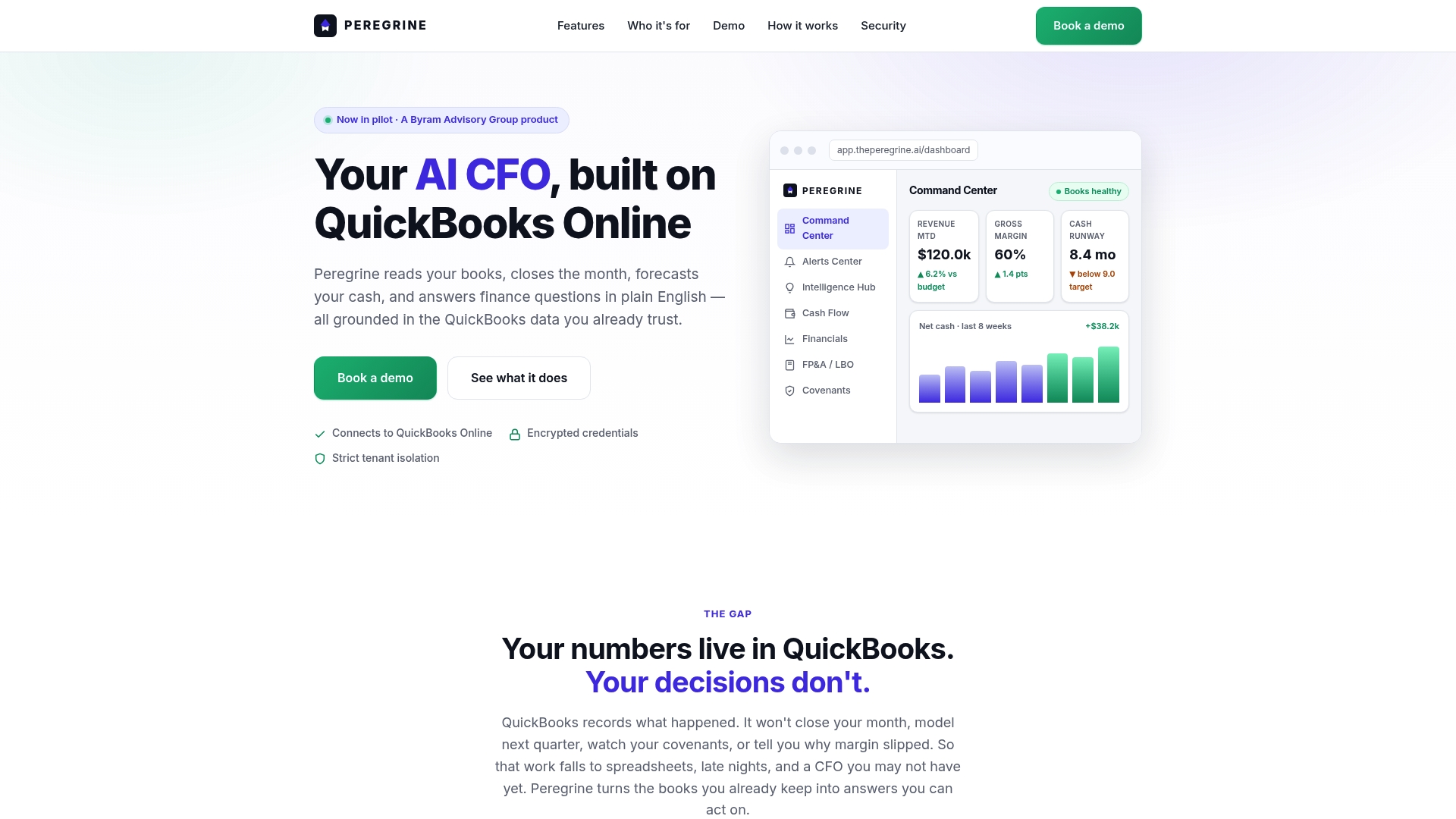
Peregrine connects directly to your QuickBooks Online file via a native integration, then puts plain-English queries, automated anomaly detection, cash-flow forecasting, and variance narrative generation in one place. Multi-entity support means fractional CFOs can manage an entire client portfolio from a single dashboard without toggling between files. Every output carries an audit trail, and confidence scoring routes low-certainty items to human review before anything posts.
The 14-day free trial is billed per connected QBO entity, so you can run a single-client pilot at no cost before expanding. Start your trial at Peregrine and have your first plain-English query running against live QBO data within the same day.
Sources
- How generative AI can make accountants more productive — MIT Sloan
- AI agents for month-end close automation — Corporate Finance Institute
- A modular RPA framework for spreadsheet-centric financial analytics — MDPI (2026)
This article is general information, not a substitute for advice from a qualified financial advisor. Consult a qualified financial professional about your own circumstances before acting on anything here.